#ad This guide contains affiliate links. If you buy through them, GamerDeals may earn a commission at no extra cost to you. As an Amazon Associate we earn from qualifying purchases.
Best Gaming Mouse Under 50 Dollars (2026)
Published October 19, 2026 · Updated October 19, 2026
You don't need to spend 100 dollars or more on a good gaming mouse. Under 50 dollars you can get proven sensors from Logitech and Razer, plus wireless if you want it. What you give up is mostly extras: rechargeable batteries, very light shells and high polling rates. Pick by shape and connection first, then by buttons. Every mouse below typically sells for under 50 dollars on Amazon; prices change, so check the current price on Amazon. Amazon prices change often, so check the current price before you buy.
Quick picks
- Best wireless mouse under 50 dollars: Logitech G305 Lightspeed Wireless Gaming Mouse
- Best wireless pick with extra buttons: Razer Basilisk V3 X HyperSpeed Customizable Wireless Gaming Mouse
- Best for MMOs and lots of keybinds: Logitech G502 Hero Wired Gaming Mouse
- Best low-cost ergonomic pick: Razer DeathAdder Essential Ergonomic Wired Gaming Mouse
Best wireless mouse under 50 dollars: Logitech G305 Lightspeed Wireless Gaming Mouse

Who it's for: Shooter players and anyone who wants a light, simple wireless mouse for a desk or a laptop bag.
Key specs:
- Lightspeed 2.4GHz wireless (USB receiver stores inside the mouse)
- HERO sensor, up to 12,000 DPI
- 6 programmable buttons
- One AA battery (Logitech rates about 250 hours)
- About 99 g with battery
- Low-latency wireless at a wired-mouse price
- Small symmetrical shape that's easy to flick
- Receiver stores inside the mouse for travel
- AA battery, not rechargeable
- Too small for some large hands
- No Bluetooth
Best wireless pick with extra buttons: Razer Basilisk V3 X HyperSpeed Customizable Wireless Gaming Mouse

Who it's for: Players who want wireless plus a full set of side buttons, and who'd like Bluetooth for a laptop or work.
Key specs:
- Razer HyperSpeed 2.4GHz wireless plus Bluetooth
- Razer 5G Advanced 18K optical sensor, 1000 Hz polling
- 7 programmable buttons, including a multi-function trigger
- One AA battery (Razer rates up to 285 h on HyperSpeed, 535 h on Bluetooth)
- About 110 g
- Two wireless modes in one mouse
- 7 programmable buttons to the G305's 6, including a multi-function trigger
- Very long rated battery life
- Heavier than the G305
- AA battery and no wired mode (it has no cable port)
- Right-handed only
Best for MMOs and lots of keybinds: Logitech G502 Hero Wired Gaming Mouse
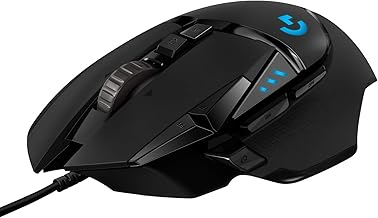
Who it's for: MMO, MOBA and strategy players, and palm grippers with medium-to-large hands who don't mind a cable.
Key specs:
- Wired USB
- HERO 25K sensor, up to 25,600 DPI
- 11 programmable buttons
- Adjustable weights
- On-board memory for profiles
- The most buttons of these picks
- Weight tuning for a more planted feel
- Scroll wheel switches between free-spin and clicky
- Heavy (about 121 g before the extra weights)
- Wired only
- Right-handed only
Best low-cost ergonomic pick: Razer DeathAdder Essential Ergonomic Wired Gaming Mouse

Who it's for: Right-handed palm grippers on a tight budget, and first-time PC gamers who want a reliable mouse from a known brand.
Key specs:
- Wired, 1.8 m cable
- 6,400 DPI optical sensor
- 5 programmable buttons
- Razer mechanical switches rated for 10 million clicks
- About 96 g (without cable)
- Lowest price of these picks
- Classic DeathAdder ergonomic shape
- Simple layout with nothing extra to learn
- Single-color lighting only
- Fewer buttons than the G502 Hero
- Wired only, right-handed only
Verdict
For most people the Logitech G305 is the one to get: it's wireless, light and was the cheapest wireless pick here. If you want more buttons or Bluetooth, get the Razer Basilisk V3 X HyperSpeed. If you play MMOs or want lots of keybinds and don't mind a cable, the Logitech G502 Hero is the better fit. If you want to spend as little as possible, the Razer DeathAdder Essential is a solid, comfortable wired mouse.
Buying tips
- Choose shape before specs. Right-handed ergonomic mice like the DeathAdder Essential suit palm grip. Smaller symmetrical mice like the G305 suit claw and fingertip grip.
- Every sensor here is more than accurate enough for gaming. Most players use 400 to 1,600 DPI, so a higher maximum DPI isn't a reason to buy.
- AA-powered wireless mice like the G305 and Basilisk V3 X HyperSpeed run a long time on one battery. A rechargeable AA works if you want to avoid buying batteries.
- If you play shooters, a lighter mouse is usually easier to aim with. If you play MMOs, extra side buttons matter more than weight.
- Under 50 dollars, the price difference between wired and wireless is small, so pick based on your desk and whether you want to manage a cable.